Local RUA Workbench: read your DMARC aggregate reports on your own machine
Drop the DMARC aggregate (RUA) reports your mailbox receives (.xml, .gz or .zip) into one HTML file and see who sends mail as your domain, what passes, what fails and why. Nothing is uploaded: the page blocks every network connection with its own Content Security Policy.
One-off £15 GBP. Instant download after PayPal confirms the payment. No account, no subscription, no hosted dashboard.
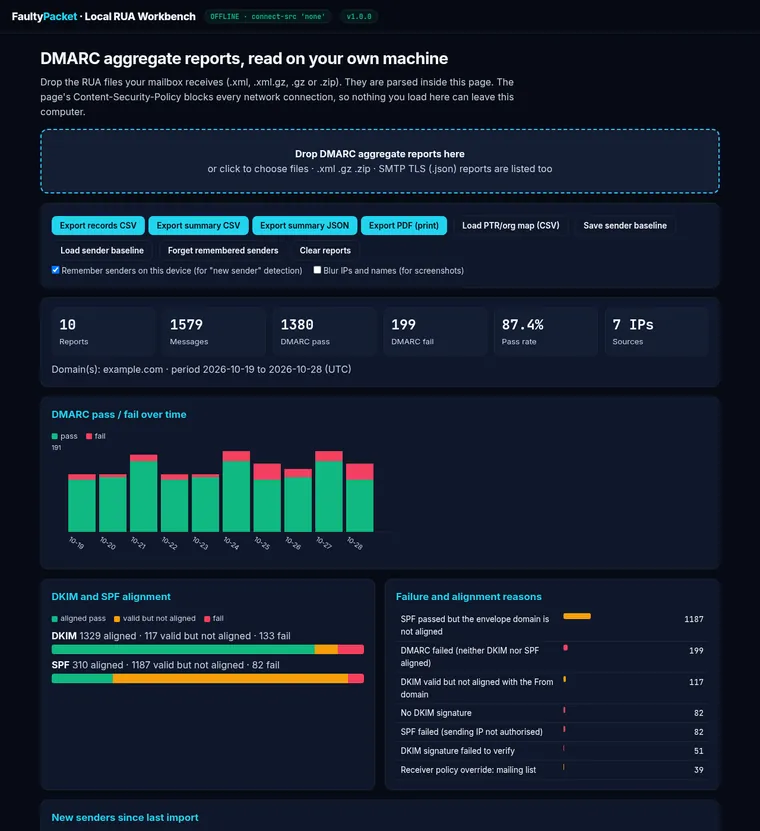
Screenshot with the synthetic sample reports that ship in the pack (example.com, documentation IP ranges).
What you see
Pass and fail over time
DMARC pass and fail per day across every report you load, with the overall pass rate.
Top sources
Sending IPs and sender organisations by volume, with optional reverse DNS (CLI) or your own IP-to-name map (browser).
DKIM and SPF alignment
Aligned pass, valid-but-not-aligned and fail, shown separately for DKIM and SPF.
Failure reasons
Why mail failed: no DKIM signature, DKIM or SPF valid for another domain, SPF not authorised, receiver overrides.
New senders
Sources not seen in your saved baseline are flagged, so a new mail platform or an unexpected sender stands out.
Exports
Records CSV, summary CSV and JSON, and a print-ready PDF view for change tickets and board packs.
What is in the download
workbench.html: the single-file workbench. Open it in Chrome, Edge, Firefox or Safari, with or without a network connection.rua_workbench.py: a Python 3 command-line tool (standard library, no installs) that gives the same summary, plus CSV, JSON and HTML output and a sender baseline for scheduled runs.- Synthetic sample reports for
example.comto try it out before you load your own. - A README with quick-start steps, and the licence.
Why local
Aggregate reports list the IP addresses and volumes of mail sent as your domain. Reading them on your own device means there is no extra processor to add to your records, no account to manage and no copy of the reports anywhere else. The workbench reads standard RFC 7489 aggregate reports (and the newer DMARCbis namespace), and shows SMTP TLS reports (RFC 8460) in their own table.
Questions
- Does it change my DNS or send anything?
- No. It reads files you choose and shows a summary. The page has no network access at all; the CLI looks up reverse DNS when you pass
--ptrand never otherwise. - How many reports can it handle?
- Hundreds of daily reports load in a few seconds in the browser. For very large archives, the CLI reads a whole folder in one go.
- Where do I get the reports?
- They arrive at the address in the
rua=tag of your DMARC record. Our free guide on reading a DMARC aggregate report explains the format, and the free scanner shows your current record. To keep them on systems you control, see keep DMARC reports on infrastructure you control. - Refunds?
- See refunds and terms. Help is at support.